Il tuo store Shopify,
gestito dagli agenti AI.
Presidiato da noi.
Automatizziamo campagne, pricing e feed su Google, Meta e TikTok — 24 ore su 24, 7 giorni su 7. Al tuo fianco con consulenza umana per tutto il periodo.
Nessun impegno. Ricevi 3–5 quick win concreti sul tuo store.
Non un software.
Un operatore.
Elise è un agente AI specializzato nella gestione di store Shopify. Lavora 24/7 su campagne, pricing e feed — e propone ogni azione prima di eseguirla. Al suo fianco, consulenti umani presidiano strategia e risultati per tutto il periodo.
- Gestisce bid su Google Ads, Meta e TikTok in tempo reale
- Aggiorna i prezzi in base ai competitor
- Corregge errori sul feed automaticamente
- Monitora anomalie e segnala opportunità
- Propone ogni azione prima di eseguirla
Stai spendendo in ads.
Ma non stai ottimizzando abbastanza.
I bid vengono aggiustati una volta ogni tanto, non ogni ora. I prezzi non tengono il passo con la concorrenza. Il feed su Merchant Center ha errori che nessuno ha il tempo di correggere.
Non è colpa tua. È che la gestione manuale richiede più ore di quelle che hai.
Campagne
Le campagne vengono ottimizzate saltuariamente. Nel frattempo il budget brucia su audience che hanno smesso di convertire.
“Ottimizzi i bid una volta a settimana. Nel frattempo stai bruciando budget su keyword che non convertono.”
Pricing
I concorrenti cambiano i prezzi di notte. Il giorno dopo hai già perso vendite senza saperlo.
“I concorrenti abbassano i prezzi di notte. Il giorno dopo hai perso vendite che non sai di aver perso.”
Feed
Una parte dei prodotti ha errori sul feed. Google non li mostra, tu non lo sai, e il budget va sprecato su ciò che resta.
“Il 15–20% dei prodotti ha errori sul feed. Google non li mostra. Tu non lo sai.”
Non un tool da configurare da solo.
Non un'agenzia che sparisce tra una call e l'altra.
Elise combina agenti AI che lavorano 24/7 e consulenti umani che presidiano strategia e risultati — per tutto il periodo che lavoriamo insieme. Tu non tocchi nulla. Noi gestiamo tutto.
| Agenzia trad. | Elise | |
|---|---|---|
| Ottimizzazione bid | 1×/settimana | Ogni ora, 24/7 |
| Pricing dinamico | Manuale | Automatico, real-time |
| Consulenza inclusa | A pagamento | Inclusa nel piano |
| Gestione feed | Saltuaria | Continua, AI-driven |
| Costo mensile | €2k–€5k | Da €1.500/mese |
Come funziona Elise
Audit gratuito
Analizziamo il tuo account ads, il feed e i prezzi. Ti consegniamo 3–5 quick win concreti, senza impegni.
Setup agenti
Configuriamo gli agenti AI sul tuo store e sulle tue piattaforme. Richiede 1–2 settimane.
Esecuzione 24/7
Gli agenti ottimizzano campagne, aggiornano prezzi, correggono il feed, monitorano anomalie — in continuo.
Consulenza umana
Review periodiche, strategia, aggiornamenti. Non sei mai solo. Non ricevi solo report.
Tutto quello che serve per far crescere il tuo store.
Campagne paid
Google Ads, Meta, TikTok. Bid management continuo, struttura account, testing creativo, ottimizzazione ROAS.
Google Merchant Center
Ottimizzazione feed, correzione errori, attributi prodotto, Shopping e Performance Max.
Competitive pricing
Scraping prezzi in tempo reale. Aggiornamento automatico. Mantieni il vantaggio senza intervento manuale.
Analytics & reporting
Dashboard personalizzata. Report periodici chiari. Sai sempre cosa sta succedendo e perché.
Custom
Integrazioni, flussi su misura, automatizzazioni particolari. Ne parliamo.
Tutto sotto controllo,
sempre.
Una dashboard operativa, un'action queue, una chat con l'agente. Approvi o rifiuti ogni proposta in un click.
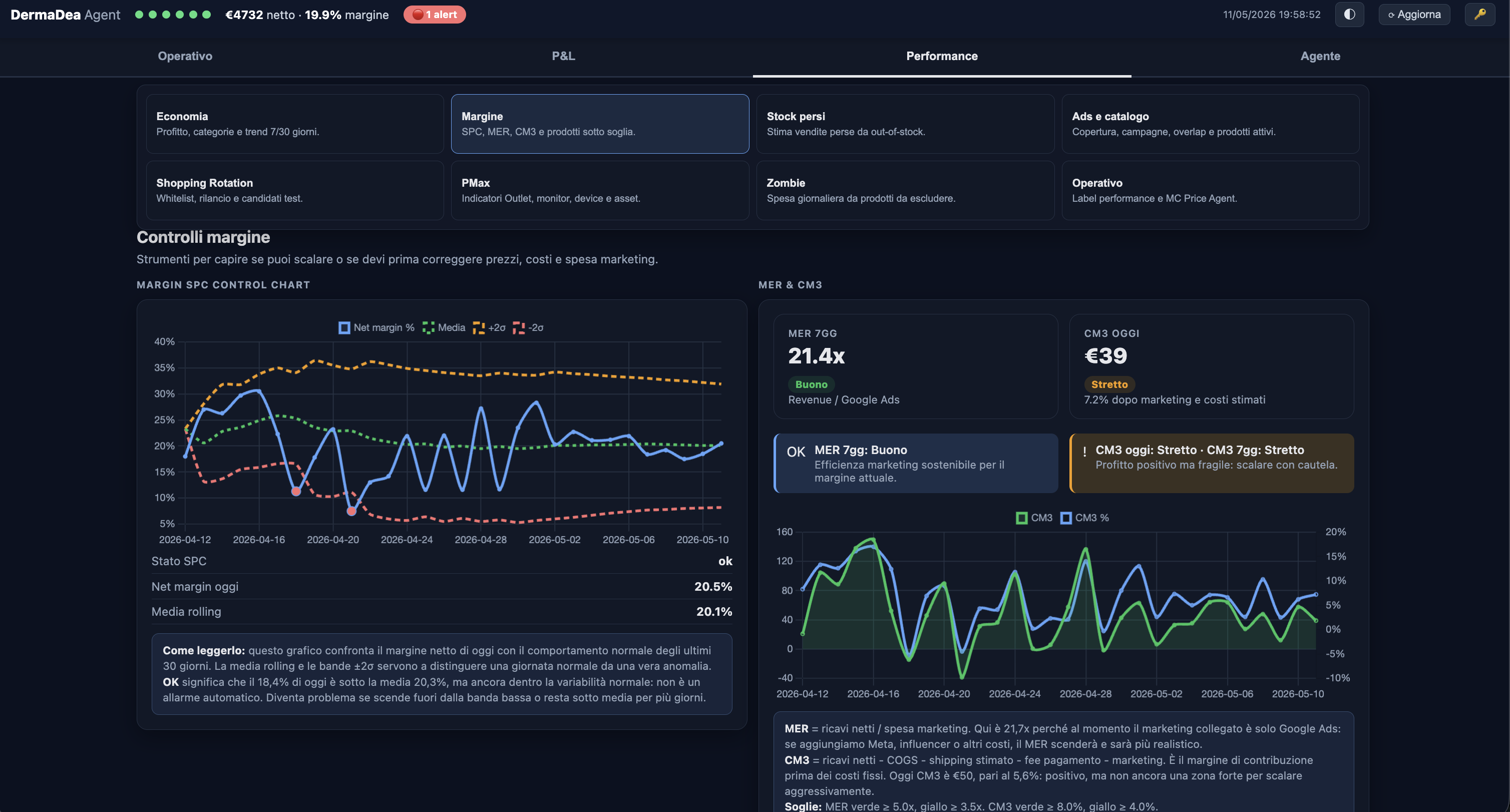
Vuoi vedere cosa l'agente segnalerebbe sul tuo store? Prenota l'audit gratuito →
Scegli il piano giusto per te.
Contratto mensile. Disdici quando vuoi.
- 1 piattaforma ads (Google, Meta o TikTok)
- Feed management
- Pricing monitoring
- Report mensile
- 1 call/mese
Setup definito sul progetto
- 3 piattaforme ads (Google + Meta + TikTok)
- Feed + Merchant Center completo
- Competitive pricing automatico
- Dashboard personalizzata
- 2 call/mese + account manager
- Accesso prioritario al team
Setup definito sul progetto
- Tutto di Growth, senza limiti
- Custom automations su misura
- Gestione multi-mercato (IT/EN/FR/ES)
- Review settimanali + Slack dedicato
- SLA prioritario
Setup definito sul progetto
IVA esclusa · Contratto mensile, disdetta in qualsiasi momento · Audit gratuito senza impegno
Costruito su pressione reale.
Costruito sulla pressione reale
Non siamo stati costruiti in un laboratorio. Siamo stati costruiti guardando store perdere denaro ogni settimana, aspettando l'ottimizzazione manuale che non arrivava abbastanza in fretta.
Un operatore, non un tool
C'è uno strato di consulenza umana che supervisiona ogni azione dell'agente. Non ricevi solo output. Ricevi strategia, contesto e un interlocutore reale.
Approvi o rifiuti tutto
L'agente propone. Tu decidi. Nessuna modifica al tuo store o alle tue campagne avviene senza il tuo esplicito consenso. Il controllo resta sempre tuo.
Domande frequenti
Sì. Un'agenzia tradizionale lavora a ore e ti manda un report a fine mese. Noi combiniamo agenti AI che ottimizzano in continuo e consulenti umani che presidiano strategia e risultati. Il costo è più basso, l'esecuzione è più veloce.
No. Gestiamo noi tutto — setup, configurazione, operatività. Ti chiediamo solo gli accessi alle piattaforme e disponibilità per una call periodica.
I primi quick win (correzione feed, budget allocation) sono visibili nelle prime 2–4 settimane. I risultati strutturali (ROAS, margine) emergono nei primi 60–90 giorni.
No. Il setup dipende da complessità dello store, numero di canali, qualità del feed, integrazioni e automazioni richieste. Lo definiamo dopo l'audit, prima di iniziare.
Dipende dal perimetro: di solito Shopify, Google Ads, Merchant Center, Analytics e le piattaforme ads coinvolte. Usiamo accessi con permessi coerenti con il lavoro, non credenziali personali condivise.
No. Elise propone azioni, priorità e modifiche. Le regole di approvazione vengono definite insieme: puoi richiedere conferma manuale su ogni azione o automatizzare solo interventi a basso rischio.
Operiamo in italiano, inglese, francese e spagnolo. Gestiamo store che vendono in tutta Europa e nei mercati anglofoni (US, UK, Canada).
Con un audit gratuito. Analizziamo il tuo store, identifichiamo i quick win, ti presentiamo un piano. Nessun impegno finché non decidi tu.
Sì. Il contratto è mensile. Non ci sono vincoli annuali o penali. Puoi disdire con un avviso di 30 giorni.
Usa dati operativi dello store: catalogo, ordini, stock, margini, feed, performance ads, Merchant Center e fonti collegate. Il perimetro dati viene definito durante setup e audit.
Il focus principale è Shopify, perché permette un setup più rapido e affidabile. Possiamo valutare altri stack ecommerce quando catalogo, feed e piattaforme ads sono accessibili in modo stabile.
Ricevi una lettura concreta di ads, feed e pricing, con 3–5 quick win prioritari e una proposta di perimetro. Se non vediamo margine d'impatto reale, lo diciamo.
Inizia con un
audit gratuito.
Analizziamo ads, feed e pricing del tuo store Shopify. Ricevi 3–5 quick win concreti. Nessun impegno.
Compila il brief →Risposta entro 24 ore. Nessuna vendita.